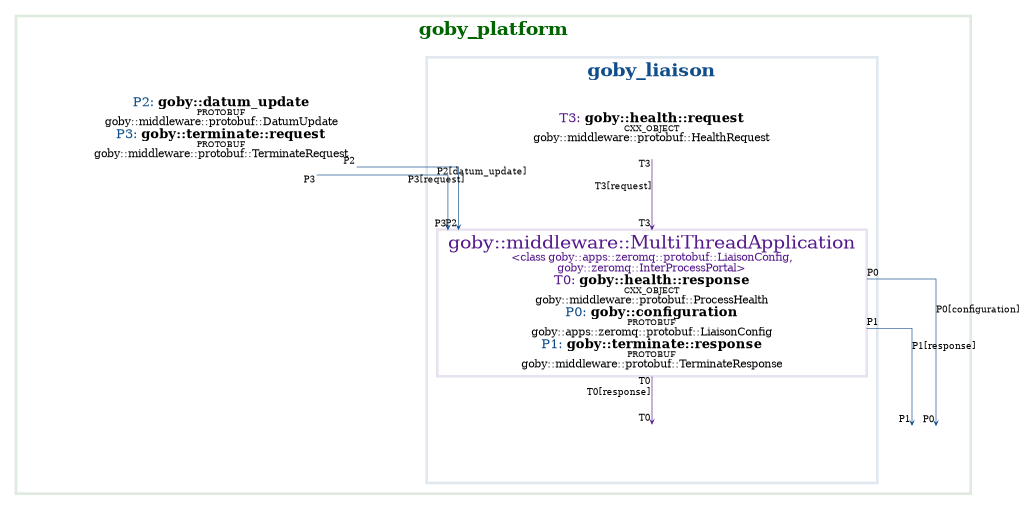
goby_liaison is a C++ web server based on the Wt toolkit. It has several built-in "tabs" and users can write their own tabs and load them using shared libraries (dlopen). Each tab runs in its own thread and can be selected from a menu that runs along the left side of the web page.
The built-in tabs include:
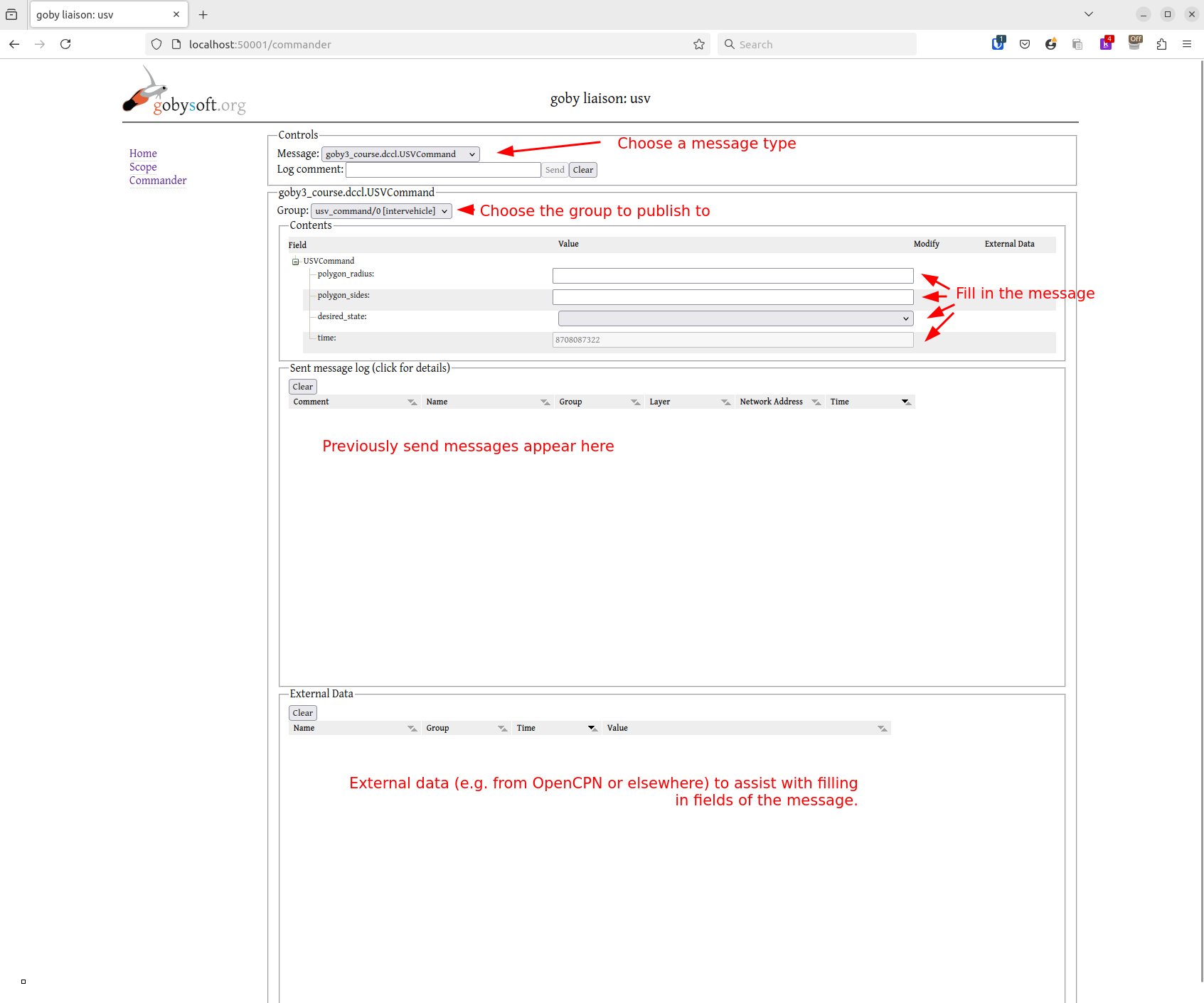
- Commander: A form for allowing users to publish any Protobuf message on the intervehicle or interprocess layer. This is typically used for sending commands from an operator to one or more vehicles over the intervehicle layer.
- Scope: A live table showing the latest of all groups containing Protobuf messages published in the interprocess layer, and the ability to show a streaming history of any group. This is a helpful debugging tool, and can be thought of as the GUI equivalent of
goby zeromq subscribe. - Map: A map of the operating area, drawn with Leaflet.
Common Configuration
Several configuration values can be set regardless of the tabs in use:
http_address: IP address or hostname to bind on, e.g., '127.0.0.1' for IPv4 localhost or '0::0' for all addresses.http_port: Port to bind on, defaults to 54321. Set to80for the default HTTP port (but this usually requires root privileges and won't work if any other server such as Apache is running on that port).docroot: Path to Liaison static objects directory. This can typically be omitted unless you've installed goby_liaison somewhere non-standard.load_shared_library,load_proto_file,load_proto_dir: Three ways to specify Protobuf message definitions to load, which is required to decode any messages used by Commander or Scope.add_home_tab: Defaults to true - set false to omit the Home tab.add_scope_tab: Defaults to true - set false to omit the Scope tab.add_commander_tab: Defaults to true - set false to omit the Commander tab.add_map_tab: Defaults to true - set false to omit the Map tab.
To access goby_liaison from the client side, open a web browser to http://<http_address>:<http_port>
Commander
The following image shows the Liaison Commander using the USVCommand protobuf message from the Goby3 Course, before filling in the message:
After filling in your message and sending it, your window will look something like this:
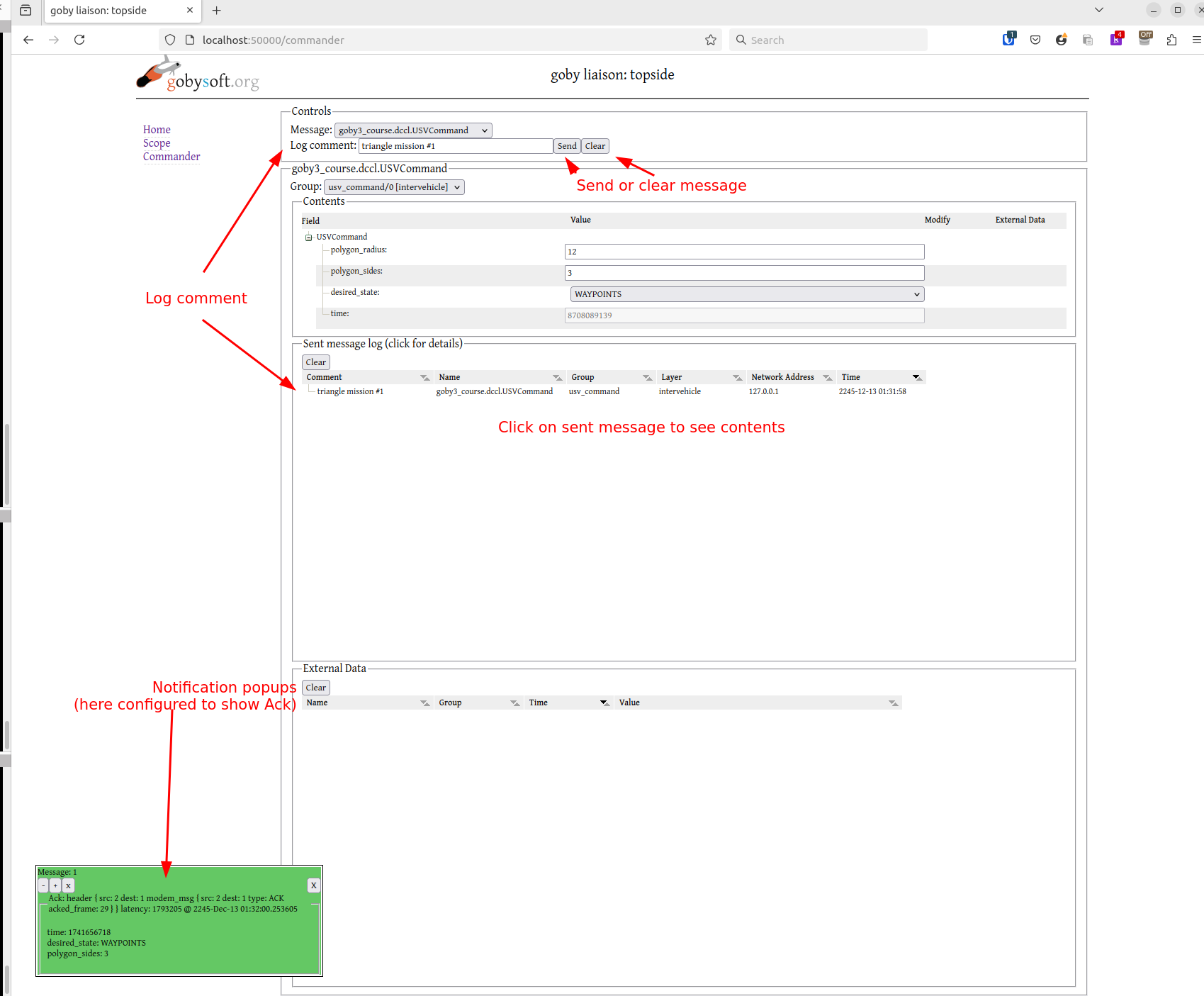
The relevant configuration for creating the Commander UI shown above is:
The pb_commander_config block informs goby_liaison of the messages to load and how to publish them after they are filled out and sent by the user:
- pb_commander_config;
- load_protobuf:
- name: Full protobuf name (
package.message). This Protobuf message must be "known" togoby_liaisonusingload_shared_library,load_proto_file, orload_proto_dir. - publish_to:
- group: The Goby group to publish to (string name)
- group_numeric: The numeric group (if any) to publish to (for the
intervehiclelayer).0is the "broadcast" group - layer: Enumeration for the layer to publish to (LAYER_INTERVEHICLE or LAYER_INTERPROCESS).
- external_data: Groups to subscribe to and parse for the "external data" tab
- name: Protobuf name
- group: Goby group to subscribe to
- translate: Map fields from this message to the message in Commander:
- from: external_data field (fully qualified using '.' separator)
- to: Commander message field (fully qualified using '.' separator)
- name: Full protobuf name (
- load_protobuf:
When using the LAYER_INTERPROCESS version of goby_liaison's Commander, this is equivalent to a GUI version of the command line tool goby zeromq publish.
Scope
The goby_liaison Scope gives a live view of all the messages in the connected interprocess layer:
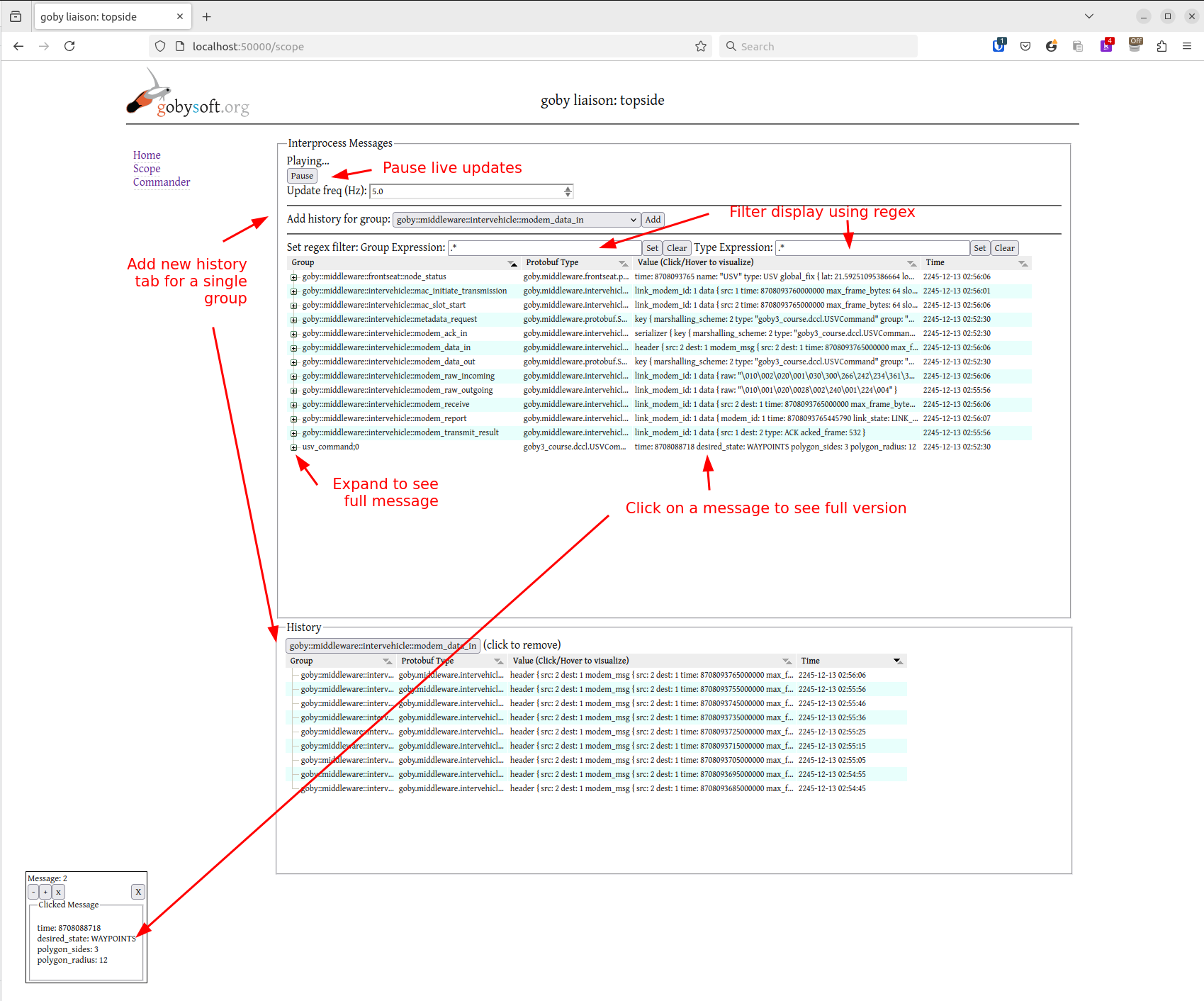
The default configuration is usually sufficient, but you can customize many of the settings to optimize for your own uses:
- pb_scope_config
- column_width: Customize initial width of all display columns
- group_width: "Group" column width (in pixels).
- type_width: "Protobuf Type" column width (in pixels).
- value_width: "Value" column width (in pixels).
- time_width: "Time" column width (in pixels).
- sort_by_column: Initial sort column (defaults to COLUMN_GROUP)
- sort_ascending: Defaults true, set false to sort descending.
- scope_height: in pixels
- history_height: in pixels
- group_regex_filter_expression: Initial regex, defaults to '.*' (show all groups).
- type_regex_filter_expression: Initial regex, defaults to '.*' (show all types).
- history: Always show history for one or more groups.
- max_history_items: Max number of history items show (circular buffer): Defaults to 100.
- max_message_size_bytes: Messages larger than this size are omitted to reduce CPU load. Defaults to 2048B.
- column_width: Customize initial width of all display columns
Map
The goby_liaison Map shows the vehicles reporting on the interprocess layer, each as an arrow pointing along its heading with a track of where it has been. The layer control at the map's top right chooses the background, which the browser fetches from public servers and remembers per viewer. By default the bases are GEBCO bathymetry (worldwide, about 450 m resolution), OpenStreetMap and Esri's Ocean basemap (whose terms of use apply); the overlays are NOAA's chart display service as NOAA depths (soundings, contours and depth shading) and NOAA chart (everything else), both on, a full nautical chart in US waters and transparent elsewhere, and the OpenSeaMap seamarks (off).
Positions come from goby.middleware.frontseat.protobuf.NodeStatus on goby::middleware::frontseat::node_status, as published by goby_frontseat_interface. Vehicles are named by NodeStatus.name. Positions received over the intervehicle layer must be republished on interprocess to be shown.
The list below the map shows each vehicle's heading, speed, depth, latitude and longitude, and the age of its last position, plus its pitch, roll, altitude and local x and y once any vehicle reports them. Click a row to centre on that vehicle, or choose it under Follow to keep it centred (dragging the map stops following). Vehicles that have not reported for stale_timeout_seconds are faded and show their age beside their name; Show age does this for every vehicle. The Trail slider sets how far back each track is drawn, from Off through 30 s to 2 h, or All; points age out of the trail even when a vehicle stops reporting. Show depth adds a gauge beside each vehicle below the surface: the surface at the top, 5000 m at the bottom on a log scale, with ticks at 10, 100 and 1000 m. Tracks start when the browser opens the page.
Add ENC uploads an S-57 electronic navigational chart: a cell's .000 file, or a .zip of cells such as those NOAA publishes. Liaison stores it under enc_dir, converts it with GDAL's ogr2ogr (which must be on the PATH, e.g. from gdal-bin), and draws it for every viewer as an overlay named after the cell: depth areas, land, contours, and aids to navigation and hazards with their names on hover. The soundings of every cell are a separate overlay, ENC soundings, shown from zoom 15, with the depth units each cell declares named in the map's corner. This is a simplified display for situational awareness, not a certified chart. Uploads are limited by Wt's max-request-size, set to 128 MB in the docroot's wt_config.xml.
- pb_map_config
- source: Position sources, replacing the default NodeStatus source:
- kind: NODE_STATUS (
NodeStatus) or GPSD_TPV (goby.middleware.protobuf.gpsd.TimePositionVelocityfromgoby_gps). - group_regex: Defaults to
goby::middleware::frontseat::node_statusorgoby::middleware::groups::gpsd::tpv. - name_override: Vehicle name for messages without one (always used for GPSD_TPV). Defaults to this platform's name.
- kind: NODE_STATUS (
- fit_on_first_fix: Zoom to the first vehicle position received. Defaults to true.
- track_length: Most track points kept per vehicle. Defaults to 5000.
- track_min_move_meters: Minimum movement before a new track point is added. Defaults to 1.
- stale_timeout_seconds: Defaults to 60.
- show_age: Start with Show age checked. Defaults to false.
- show_depth: Start with Show depth checked. Defaults to false.
- trail_seconds: Initial Trail, rounded to the slider's nearest step; 0 for none, negative for every kept point. Defaults to 600.
- tile_layer: The layers offered in the layer control, replacing the default layers:
- name: Label in the layer control. Defaults to the URL's host.
- url_template: Leaflet URL template, e.g.
https://tile.openstreetmap.org/{z}/{x}/{y}.png, or the service URL forwms. Tiles placed undertiles/in the docroot can be referenced astiles/{z}/{x}/{y}.png. - wms: Request from a WMS service:
layers(required),format,version,styles. - attribution: HTML attribution shown in the corner of the map.
- min_zoom, max_zoom: Zoom range the layer is shown at.
- max_native_zoom: Highest zoom the server has tiles for; beyond it, its tiles are enlarged.
- overlay: Set true for a layer drawn above the base and switched on and off by itself; otherwise it is one of the bases to choose between, the first selected to start.
- shown: Whether an overlay starts switched on. Defaults to true.
- depth_units: Units of the depths the layer labels, named in the map's bottom-left corner while it is shown (feet for the default NOAA chart).
- tile_size: Pixels per WMS image; 512 means fewer requests and fewer labels cut at image edges. Defaults to 256.
- opacity: 0 to 1.
- blank_background: Set true to draw no tiles, e.g. without network access.
- enc_upload: Offer Add ENC. Defaults to true.
- enc_dir: Where uploaded ENCs are kept. Defaults to
$HOME/.goby/liaison/enc. - initial_lat, initial_lon, initial_zoom: Initial view.
- map_height: in pixels
- source: Position sources, replacing the default NodeStatus source:
Leaflet itself is served from the docroot so the map works without network access. goby_liaison passes the docroot's wt_config.xml to Wt, which sets the leafletJSURL and leafletCSSURL properties. If you set WT_CONFIG_XML or pass --config in additional_wt_http_params, that file is used instead and must set these two properties for the map to load. If these point at a CDN that the browser cannot reach, opening the Map tab stops that browser's Liaison session (reload to recover).
Writing your own tab
You can create and load your own tab in goby_liaison using the Wt toolbox and a shared library plugin (.so).
These open source examples will be helpful to explore while creating your own tab:
- The Jaiabot post-launch plugin (publish/subscribe): https://github.com/jaiarobotics/jaiabot/tree/1.y/src/lib/liaison/postlaunch
- The Jaiabot pre-launch plugin (no publish/subscribe, no gobyd): https://github.com/jaiarobotics/jaiabot/tree/1.y/src/lib/liaison/prelaunch
- The NETSIM plugin (publish/subscribe): https://github.com/GobySoft/netsim/tree/master/src/lib/liaison
Each tab is a subclass of goby::zeromq::LiaisonContainer (which is a Wt::WContainerWidget), which is defined in:
If your tab needs to publish/subscribe, you should subclass from goby::zeromq::LiaisonContainerWithComms (which is a goby::zeromq::LiaisonContaine) and pass your subclass of goby::zeromq::LiaisonCommsThread (which is a goby::middleware::SimpleThread) as a template parameter.
Your plugin library must define a C function goby3_liaison_load that is called by goby_liaison to load your tab(s). This function must have the following signature:
The usual parsed configuration file / command line parameters are available in cfg. You can extend the goby::apps::zeromq::protobuf::LiaisonConfig message (goby/zeromq/protobuf/liaison_config.proto) to allow your application to have specialized configuration. If you wish to use a public extension, create an Issue on Github and we will assign one. For private projects, simply choose any extension values in the range 10000-11000.
Finally to load your plugin, you need to define the environmental variable GOBY_LIAISON_PLUGINS with a comma, semicolon or colon delimited set of path(s) to shared libraries for goby_liaison to load. These shared libraries must be fully qualified paths or on the ld load path (e.g., using LD_LIBRARY_PATH).
A shell script can easily be defined to do all this for you (e.g., name the script goby_liaison_myproject so you can just run goby_liaison_myproject like you run goby_liaison and your tab(s) will always be loaded):
Publish/Subscribe API Diagram
(This figure excludes dynamic subscriptions / publications, which is the majority of what goby_liaison uses)