The goby command line tool is a starting point for managing, running, and understanding a Goby system from the Linux command line.
Like many modern tools (e.g., git) is has many sub-commands that allow you to access a wealth of functionality from a simple natural language syntax with built-in help.
The goby tool is available if you install from the goby3-apps package or build from source.
goby help
The help command gives information on any subcommand. For example:
gives help on the zeromq command.
goby log
This function is useful for post-mission analysis of .goby log files written by goby_logger.
goby log convert
Converts a .goby log file into useful formats: HDF5, JSON, etc. See the goby_logger page for more details.
goby launch
goby launch is a basic process manager. It launches a number of Goby application at once in series from a single .launch file. At its simplest, a .launch file is simply a list of commands to execute
goby launch runs them in a screen session by default. You can type CTRL-C to quit, using goby_terminate by default.
See goby help launch for more options.
goby test
Runs declarative publish/subscribe tests against a Goby system, for example in CI or after a deployment, without writing a Goby application. It has three actions:
runstarts the test's fixtures, runs the test and stops the fixtures. It exits 0 when every expectation passed, 1 when one failed, and 2 when the test could not run (an invalid file, a fixture that never became ready, an endpoint that could not connect, a required application that never responded, or an interruption).validatechecks the file without connecting to anything and lists every problem with its location (such astest.run[2].expect[0].match). It exits 0 when the file is valid and 1 otherwise.runperforms the same checks first.visualizewrites the test plan as a Graphviz graph, e.g.goby test visualize nav.yml | dot -Tpng -o nav.png.
The test file is YAML (.yml/.yaml), JSON (.json) or Protobuf TextFormat (any other extension). Its fields are the TestFile message in goby/apps/middleware/test_tool/test_tool_config.proto, with the test itself in goby/middleware/protobuf/pubsub_test.proto. YAML requires Goby built with yaml-cpp (libyaml-cpp-dev; -Denable_yaml=ON, the default when found).
Test file
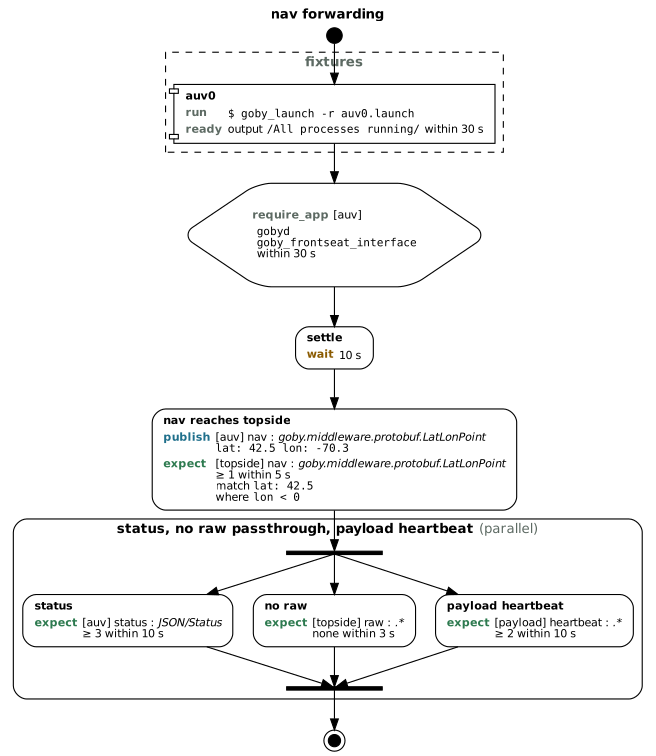
endpoint: named connections, each withzeromqsettings (onegobyd) orudpmsettings (one multicast group), on the interprocess (LAYER_INTERPROCESS, the default), intermodule (LAYER_INTERMODULE) or intervehicle (LAYER_INTERVEHICLE, see below) layer. A test may mix transports. An endpoint with neither uses zeromq when Goby was built with it, otherwise udpm; with no endpoints, one nameddefaultis created. Endpoint settings are layered overrun's--zeromq(alsoGOBY_INTERPROCESS) and--udpmsettings.fixture: commands (run with/bin/sh -c, incwd, each in its own process group) started in order before the test, each waiting until it isready: everyoutput_regex(one or more) has matched a line of output withintimeout, in any order, then an optionaldelay. After the test they are stopped in reverse order withstop.signal(defaultSIGINT), escalating toSIGTERMandSIGKILLafterstop.graceseconds. On Linux,goby testalso stops descendants that left the process group (such as detachedscreensessions). Each fixture's output is written to a log in--log_dir(a new temporary directory by default); a failed test's report includes the log path and its last lines.test.require_app: application names that must answer the coroner health request before the runs start; a runninggoby_coroner's report is used instead once seen.test.run: runs executeSEQUENTIAL(default) orPARALLELas given bytest.mode. A run holdspublish,expectandwaitentries directly, or a list ofstepentries executed by its ownmode. Awaitkeeps a run or step open for at least that long; on its own it is a pause.
Within a run or step the expectations are subscribed first, then the publications are sent (after delay), then the tool waits until every expectation is satisfied or times out. An expectation names an endpoint, a group regex and a type regex (optionally prefixed by a scheme, such as DCCL/), and passes when the number of matching messages satisfies min_count (default 1, done as soon as it is reached) or count (exact; the step lasts its whole timeout so that extra messages are seen, and count: 0 asserts nothing arrives). A message matches when it satisfies match, a partial message in the same syntax as publish (TextFormat for Protobuf and DCCL, JSON for JSON), and every condition (a field path such as pos.lat or waypoint[0].id, an op of EQ, NE, LT, LE, GT, GE, REGEX, EXISTS or ABSENT, and a value). Messages that fail to match are counted as rejected and the reason for the last rejection is reported. Durations are in seconds.
Intervehicle endpoints
A LAYER_INTERVEHICLE endpoint publishes and subscribes through its gobyd's intervehicle links, as an application does, so a test with one endpoint per vehicle (each with its own gobyd fixture) checks traffic across the link.
- Types are DCCL only, and groups are numeric (
group: "7";"0"is broadcast). Any other group is carried in the message:group_fieldnames the top-level integer field that holds it. - An expectation is also a subscription, made once
require_apphas passed and before the first run.intervehicle { publisher_id: 1 }lists the modem ids it is forwarded to, and a publish needs adelaythat lets it cross the link. - A publish's
intervehiclesets its buffer (ttl,max_queue,ack_required, ...),broadcastandclear_pending. Withack_required: true, its acks and expiries are reported on the publishing endpoint, in its group, asPROTOBUF/goby.middleware.intervehicle.protobuf.AckDataandExpireData.
Repeating runs
A run with repeat: N runs N times in sequence. A run with for_each runs once per entry, with ${NAME} anywhere in the run (its name, groups, types, publish values, match and conditions) replaced by that entry's value; with both, each entry runs repeat times. ${ITERATION} is the pass number, from 1. Each pass is reported as its own run, named after the run (or <name> [k/N] when the name doesn't use a variable), and validate and visualize show every pass.
for_each names must not also be set by -D or the environment, which replace ${NAME} when the file is read (validate reports this). In TextFormat an entry is written for_each { var { key: "HEADING" value: "0" } ... }.
goby test run --repeat N runs the whole test N times with the fixtures left running, and fails if any pass fails; the report lists each pass, with details for those that didn't pass.
Reusing test files
${NAME}and${NAME:-default}are replaced by-D NAME=value, then the environment, then the default (or a run'sfor_each);${TEST_DIR}is the directory of the file being read, and$${is a literal${. A name that is never set is reported byvalidate.include: [endpoints.yml]merges other files (of any format) before this one, so endpoints or fixtures can be shared.load_shared_libraryentries,includepaths and fixturecwdresolve relative to the file that declares them. Libraries can also be given with-lorGOBY_TOOL_LOAD_SHARED_LIBRARYas forpublishandsubscribe.- In CMake,
find_package(GOBY)setsGOBY_EXECUTABLEto thegobytool from the same build or installation as the libraries, e.g.add_test(NAME nav COMMAND ${GOBY_EXECUTABLE} test run nav.yml).
goby interface
Works with the publish/subscribe interface files that goby_clang_tool -gen writes for each application (<target>_interface.yml, see cmake_modules/GobyClangTool.cmake), and the deployment files that place those applications on platforms and modules (see Interfaces and deployments):
validatechecks that everyrequiredsubscription has a publisher in its scope (required-unmet, an error) and everyrecommendedone (recommended-unmet, a warning), along with problems reading the files. It exits 0 when the deployment is valid, 1 on an error (or a warning, with--strict) and 2 when the deployment file cannot be read.-o JSONwrites theInterfaceValidationmessage ingoby/apps/middleware/interface_tool/interface_tool_config.proto.visualizewrites the deployment as a Graphviz graph, e.g.goby interface visualize fleet.yml | dot -Tsvg -o fleet.svg, or with--format D2as a D2 diagram, e.g.goby interface visualize fleet.yml --format D2 > fleet.d2 && d2 fleet.d2 fleet.svg. Both use the same colors and edge styles: bold for required, tapered (dashed in D2) for recommended, dotted for regex and dashed for dynamic groups, with full group, scheme and type in each tooltip. The D2 output sets the ELK layout, which handles connections between nested containers better than D2's default. Goby's own applications are drawn for what they do in the deployment:gobydis named on its platform or module ("auv (gobyd)"), the interprocess boundary it is, and othergoby_*applications are one box with only their connections to the project's applications. Goby's threads within a project's application, Goby's internal groups (goby::configuration,goby::datum_update, terminate and health), and template arguments in thread names are left out;--expand_goby_appsdraws Goby's applications in full and--include_alldraws everything. A deployment of only Goby's applications (such as one of their interface files) is drawn in full.goby_clang_tool -viz(-format=dot|d2) draws the same graph, andgoby_visualize_interfaces(... FORMAT D2 ...)renders it in CMake.listprints each application with its thread count and publications/subscriptions per layer, each platform with its applications and modules, or each group with its publishers and subscribers.explainshows, for every publication and subscription whose group contains a match for the regex, who it reaches, and for a subscription with no publisher, why: a publisher on another layer, out of its layer's scope (interprocess in another module, intervehicle on the same platform), of another type or scheme, with other numerics, only a dynamic one with its numeric set at run time, or one whose group goby_clang_tool could not determine. It exits 1 when nothing matches.diffcompares two deployments, or one deployment against two sets of interface files (--interface_dir_aand--interface_dir_b, e.g. two builds), and lists applications and connections added or removed and required subscriptions newly unmet or newly met. Asdiffdoes, it exits 0 when they are the same, 1 when they differ and 2 when a file cannot be read.initwrites a starting deployment file that runs every application declared in a directory of interface files on one platform.- Each takes a single interface file as a one-platform deployment.
Launch files from a deployment
goby interface launch writes the goby_launch file for a platform (or one module of it, one gobyd) from its run list, so the deployment file is the one list of what runs where. --outdir writes one for every platform, instance and module. goby launch fleet.yml --platform bot1 [goby_launch options] writes the file beside the deployment (as .fleet.bot1.launch, so preseed.goby and relative paths still work) and runs it.
- An entry runs
exec(its application by default) withconfigandargs;launch: defaultsgives these,killandenvfor every Goby application on the platform, with${app}the entry's name and${instance}the instance. Aprocessentry is a program with no interface file, whichvalidateandvisualizeignore; it is stopped withSIGTERMunlesskillsays otherwise. whenruns the entry only if the condition holds when it is launched:A =~ REGEX,A == B,A != B, or a shell command whose exit status decides. Otherwise the line waits insleep infinity.enabled: falsewrites the line as a comment.hold: autoongobydholds publications until every application with a required intervehicle subscription, andgoby_intervehicle_portal, has subscribed;expected: autoongoby_coronerexpects every other Goby application except those markedexpected: false. Either takes a list instead, which may includeauto.validateandlaunchreport a Goby application listed beforegobyd(launch-order), a hold list that leaves out a required intervehicle subscriber (hold-incomplete), an expected list that differs from what is launched (coroner-expected), and a linegoby_launchwould cut at a#(launch-hash) or misread at a](launch-bracket).launch_checkcompares a hand-written launch file with the deployment, for moving to generated ones: lines with no entry, entries with no line, and differingkillorenv. It exits 0 when they agree and 1 when they differ.
systemd units from a deployment
goby interface systemd writes the same run list as systemd units: a <name>.service for each entry and a <deployment>-<platform>.target that wants them all (systemd_fleet-bot1.target below). It prints them, or writes them to --outdir (one directory per platform, instance and module when no --platform is given). --check compares them with the installed units in --unit_dir (/etc/systemd/system) and exits 1 if any are missing or differ. It never installs units or reloads systemd.
- Each Goby application's service is
BindsToandAftergobyd.serviceand stopped withgoby_terminate; aprocessis stopped with itskillsignal. A command that needs a shell (<(...), a pipe, a redirect) runs under/bin/bash -c. Relative paths in a command are relative to the service's working directory, whichservice: "WorkingDirectory=..."sets. systemd:on an entry, or as the platform'ssystemd: defaults, setsuser,group,description,wanted_by(the target by default), aconditionline, and text appended to theunit,serviceandinstallsections.templatereplaces the built-in unit with a project file, relative to the deployment, in which${exec_start},${name},${unit_name},${description},${target},${wanted_by},${user},${env}and the other settings, plus anyvars, are replaced.skip: truewrites no unit, for an entry started some other way.- A platform's
systemd: targetuses an existing unit instead of generating one, andordered: truestarts each service after the one before it. whenis decided as the units are written, from-Dand the environment: an entry whose condition is false gets no unit, and one that cannot be decided (a value left unset, or a shell command) gets none with asystemd-whenwarning; give it aconditioninstead.systemd-droppedwarns whengobyd's hold orgoby_coroner's expected names include an entry with no unit.
- A platform lists what it
runs, or groups that intomodules, each onegobyd. Connections are matched within each layer's scope: interthread within an application, interprocess within a module, intermodule across the modules of a platform, and intervehicle between platforms. - A
runentry names an application, and the interface file that declares it is found beside the deployment file, then in each-Idirectory andGOBY_INTERFACE_PATH(colon separated), then in Goby's ownshare/goby/interfaces.pluginsmerges plugin interfaces into their host application,nametells two instances of one application apart, andfilegives an interface file by path. A list of files underinterfaces(each optionally{ file: ..., application: ... }) is also accepted. ${NAME}and${NAME:-default}are replaced by-D NAME=value, then the environment.${GOBY_INTERFACES_DIR}is Goby's own interface directory.
Dynamic groups, instances and overrides
goby_clang_tool -gen records publications and subscriptions made with publish_dynamic() and subscribe_dynamic() on a DynamicGroup as dynamic: true. When the group's string is known but its numeric part is set at run time (DynamicGroup(groups::rx, cfg().modem_id())), it adds numeric: runtime; when the string itself is set at run time, the group is "*" and expr holds the C++ expression. The deployment file supplies what the code cannot:
bind(on a platform, or on onerunentry, which takes precedence) gives the numeric part of matching groups (*is a wildcard), as a number, a rangea-b, a list, or arithmetic on${instance}; or, withdynamic:selecting by layer, scheme and type, the groups and types a fully dynamic publication or subscription stands for.instancesmakes one platform per value, named<name><instance>.validatechecks each;visualizedraws the platform once (its binds taking every instance's numerics) unless--expand_instancesis given.necessitysets the necessity of the subscriptions it selects (byplatform,module,application,thread,layer,groupandtyperegexes) in this deployment, whatever the code said.- A dynamic group with its numeric still unknown reaches subscribers of the same group, drawn dashed, but does not satisfy a required subscription unless
--assume_dynamicis given. A group whose string is unknown reaches nothing.validatereports these asdynamic-unbound(warning) anddynamic-unresolved(info), and binds or overrides that select nothing asbind-unusedandnecessity-unused(warnings). - In CMake,
goby_validate_interfaces(DEPLOYMENT_YAML fleet.yml INTERFACE_DIRS ${YML_OUT_DIR})(fromfind_package(GOBY)) adds a test that runsgoby interface validate --strict.
goby zeromq
This function is for launching and interfacing with the ZeroMQ interprocess applications.
The following commands are shortcuts to the equivalent application described in the ZeroMQ applications page:
goby zeromq terminate: runsgoby_terminategoby zeromq playback: runsgoby_playbackgoby zeromq daemon: runsgobydgoby zeromq logger: runsgoby_loggergoby zeromq coroner: runsgoby_coronergoby zeromq intervehicle_portal: runsgoby_intervehicle_portalgoby zeromq gps: runsgoby_gpsgoby zeromq geov: runsgoby_geov_interfacegoby zeromq frontseat_interface: runsgoby_frontseat_interfacegoby zeromq liaison: runsgoby_liaisongoby zeromq opencpn: runsgoby_opencpn_interfacegoby zeromq moos_gateway: runsgoby_moos_gateway
goby zeromq publish
Publishes a single message to gobyd on the interprocess layer. You can either use the --interprocess parameter or set the environmental variable GOBY_INTERPROCESS to define the gobyd interprocess settings.
Usage:
You can use -l to load shared libraries containing your custom Protobuf messages, or set the environmental variable GOBY_TOOL_LOAD_SHARED_LIBRARY.
goby zeromq subscribe
Subscribes to all or some messages from gobyd on the interprocess layer. You can either use the --interprocess parameter or set the environmental variable GOBY_INTERPROCESS to define the gobyd interprocess settings.
You can use -l to load shared libraries containing your custom Protobuf messages, or set the environmental variable GOBY_TOOL_LOAD_SHARED_LIBRARY.
If you omit the optional regex settings, they default to ".*", meaning that you'll see all publications.
Example of goby zeromq publish/subscribe
(optional) Set the desired interprocess community in your .bashrc or similar:
In one terminal:
In another terminal:
Finally, in a third terminal:
This publishes the goby::middleware::protobuf::LatLonPoint message defined in goby/middleware/protobuf/geographic.proto. You should then see it in the goby zeromq subscribe terminal:
goby protobuf
Functions for dealing with Protobuf messages
goby protobuf show
Displays the contents of a Protobuf message.
For example:
gives the full .proto definition:
You can use -l to load shared libraries containing your custom Protobuf messages, or set the environmental variable GOBY_TOOL_LOAD_SHARED_LIBRARY.